
Help / Publish
Connect a Telnyx phone number
Connect a Telnyx phone number so your agent answers calls on it. You paste your number and a Telnyx API key, and Cysora points the number's voice calls at your agent for you.
What you need
- A Telnyx account with a voice phone number you own.
- A Telnyx API key from your Telnyx account.
- A number that is free to hand over. Connecting replaces how that number currently routes voice calls.
Connect your number
- 1
Open the Phone tab
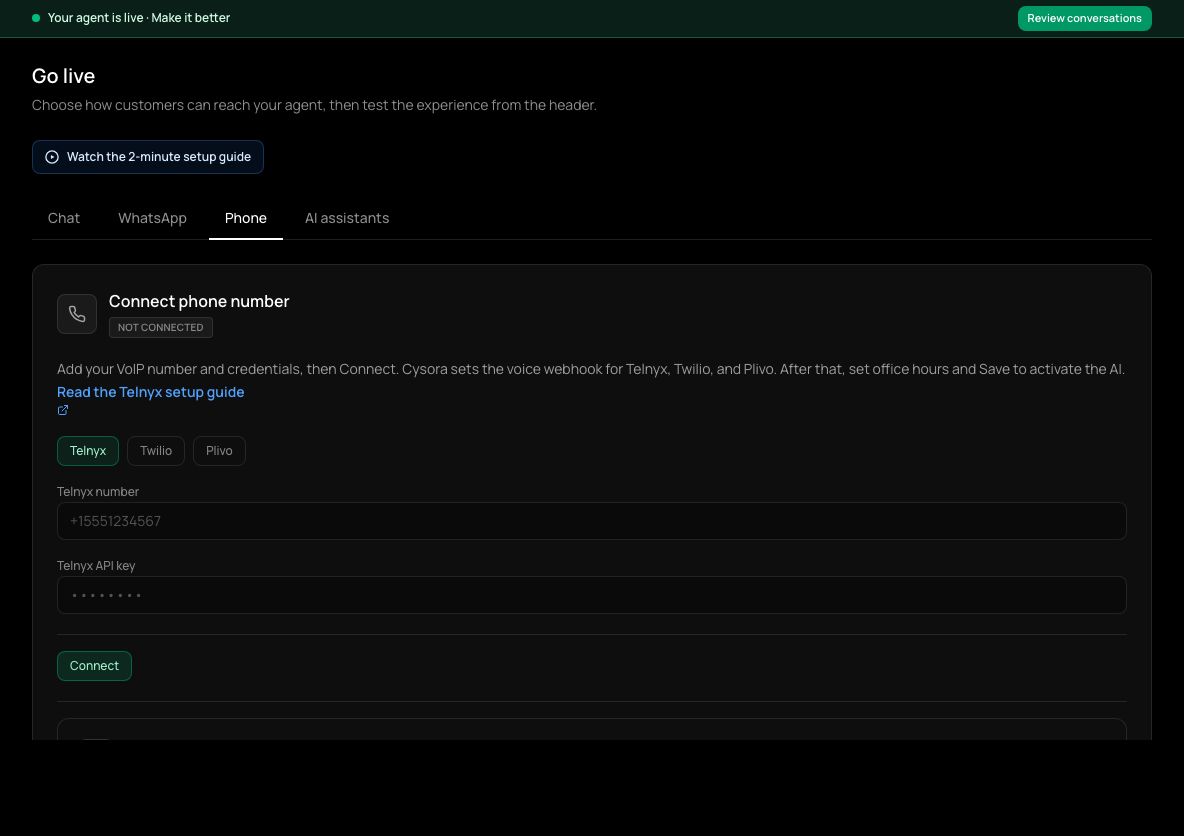
In the sidebar, choose Go live (shown as Channels & install once your agent is live), then the Phone tab.
- 2
Choose Telnyx
Select Telnyx as the provider.
- 3
Enter your number
Type your Telnyx number with its country code, like +15551234567.
- 4
Paste your API key
Paste your Telnyx API key. Cysora stores it encrypted and never shows it again.
- 5
Connect
Choose Connect. You should see that the number is connected and the webhook is configured. You do not set anything up in Telnyx yourself.
Set transfer and office hours, then go live
- 1
Transfer number
Optional. Enter a number (with country code) where calls can be passed to a person. Leave it blank and your agent handles every call itself.
- 2
Language
Enter the language code the agent should speak, such as en.
- 3
Office hours
Set Office hours start and end (like 09:00 and 17:00) and your Timezone (like America/New_York). These hours control when the AI answers, not just when a person is available. Outside the configured hours, callers hear an after-hours message and the call ends.
- 4
Save and activate
Choose Save & activate. The button shows Saved — AI live when your agent is answering.
Try it before connecting
While no number is connected, the Test on a Cysora phone line card on the Phone tab can give you a shared test number for about 30 minutes, so you can call and hear your agent first. It shows only when a test line is available.
Disconnecting
Disconnect on the Phone tab releases the number: Cysora first clears its voice setup in Telnyx, then unlinks it from your agent. You can connect it again straight away.
Check it worked
- The Phone tab shows your number as connected and your agent as live.
- Call the number from another phone: your agent answers.
If it doesn't work
- Connect says the Telnyx API key is required.
- Paste the key into the API key field before choosing Connect.
- Connect says the number is already in use.
- Another Cysora account still has this number connected. Ask them to disconnect it, or contact support.
- Disconnect fails with a provider error.
- Cysora couldn't clear the setting in Telnyx. Check your API key is still valid and try Disconnect again.
- Calls ring but your agent doesn't answer.
- Check you chose Save & activate, not just Connect, and that the time is inside your office hours.
Related guides
- Connect a Twilio phone numberConnect a Twilio number with your Account SID and Auth Token so your agent answers calls.
- Connect a Plivo phone numberConnect a Plivo number with your Auth ID and Auth Token so your agent answers calls.
- Test your agentTry your agent as a customer would, on the website chat or WhatsApp, before anyone else sees it.